FocusTable
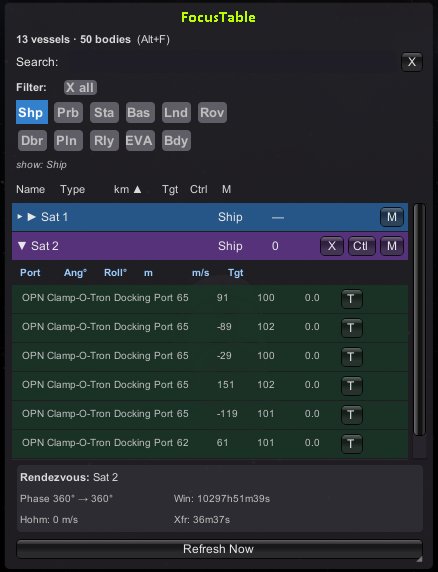
FocusTable adds a persistent, sortable vessel management window to KSP's flight and map scenes. Instead of cycling through vessels one by one, you get a live table showing every vessel and body in the current game, with at-a-glance information and quick actions.
FAQ
What Does it Do?
Instead of tabbing through vessels one by one, FocusTable gives you a live, sortable table of every vessel and body in your current save. Sort by name, type, or distance, filter by category, and take actions directly from the list — no more hunting through the tracking station.
What Information Does it Show?
Each row displays the vessel name, type, and distance in km. Rows are sortable by any column — click a header to sort ascending or descending. You can also expand any vessel to see its docking ports and their current status.
How Do I Switch to Another Vessel?
Hit the Control button on any row to instantly switch focus and control to that vessel. Hit the Target button to set it as your current target. No need to go through the tracking station or cycle through vessels manually.
What are Favourites and Notes?
You can pin any vessel to the top of the list by marking it as a Favourite — these are indicated with a * in the name column. You can also attach text notes to any vessel, which are saved between game launches. Vessels with notes are marked with [N].
What Else Can I Do With a Vessel From the Table?
Each vessel has a context menu (the M button) with options to view or edit notes, toggle favourite status, focus on the map, rename the vessel, or terminate it — all without leaving the flight or map scene.
Does it Need Any Dependencies?
Nope. FocusTable works out of the box with a vanilla KSP install and is compatible with most other mods. No Module Manager or other plugins required.
I Have an Idea For a Feature, Can I Suggest it Somewhere?
Of course! I am always open to suggestions, just leave a comment on the forum linked below. I will be creating a roadmap at some point in the future using suggestions that might get added to the forum, as well as anything I come up with.
I Have Discovered a Bug, Where Can I Report It?
As the mod is in active development, there is always potential for unexpected bugs to arise. Please report any bugs on the Forum linked below and I will try to remedy is as soon as possible!
Can I View The Source Code?
Yes, the source code is available in the download folder. It is also available to view at this Repo.
Installation
Via CKAN (Recommended)
Open the CKAN client and search for FocusTable. Tick the checkbox next to it and click Apply. CKAN will download and install the mod automatically.
Via SpaceDock (Manual)
Click the download button on this page. Open the downloaded zip file and locate the GameData folder inside it. Copy the FocusTable folder from inside GameData into your KSP GameData folder (e.g. Kerbal Space Program/GameData/).
Stats for FocusTable
Downloads over time
Downloads per version
New followers per day
Top Referrers
- spacedock.info
- forum.kerbalspaceprogram.com
- www.reddit.com
- www.google.com
- sd-prod-live.52k.de
- sd1a.52k.de
- sd1b.52k.de
- sd-prod-stage.52k.de
- github.com
- chatgpt.com
Export Raw Stats
Raw stats are from the beginning of time until now. Each follower and download entry represents one hour of data. Uneventful hours are omitted.